
TL;DR:
- Technical SEO ensures search engines can crawl, render, and index your website effectively.
- Core pillars include site speed, structured data, mobile design, and proper indexation.
- Regular audits and fixing advanced issues are vital for improving search visibility and rankings.
Most business owners assume SEO is a matter of writing good content and sprinkling in the right keywords. That belief is understandable, but it leaves a gaping hole in your strategy. If search engines cannot properly access, read, or understand your website, even the most brilliantly written page will sit invisible on page four. Technical SEO is the hidden foundation beneath every successful search ranking, and for UK small and medium-sized businesses competing in crowded markets, getting it right is not optional. This guide will show you exactly what technical SEO covers, how to audit your own site, and which pitfalls to avoid so your rankings can finally reflect the quality of your business.
Table of Contents
- Defining technical SEO: Beyond keywords and content
- The essential pillars of technical SEO
- How to carry out a technical SEO audit
- Advanced issues and common technical SEO pitfalls
- Why technical SEO separates winners from invisible websites
- Expert technical SEO support for your UK business
- Frequently asked questions
Key Takeaways
| Point | Details |
|---|---|
| Technical SEO foundation | Technical SEO involves optimising the infrastructure of your website so search engines can easily crawl and index it. |
| Core elements matter | Site speed, mobile-friendliness, crawlability, and structured data all play vital roles in search rankings. |
| Regular audits recommended | Use reliable tools and audits to uncover and fix issues before they impact your Google rankings. |
| Avoid hidden pitfalls | Even small, unseen errors like pagination or misconfigured HTTPS can block search visibility. |
Defining technical SEO: Beyond keywords and content
Having set the stage for why search visibility goes beyond content, let’s clarify what technical SEO actually covers.
Technical SEO is the process of optimising a website’s infrastructure so search engines can crawl, render, index, and serve content correctly and efficiently. Think of it this way: your content is the product on the shelf, but technical SEO is the building itself. If the doors are locked, the lights are off, and the shelves are in the wrong order, customers (and search engines) will leave before they ever see what you sell.
“Technical SEO is not a one-time task. It is an ongoing process of ensuring your site infrastructure keeps pace with how search engines evolve.”
There are three broad categories of SEO, and understanding where technical SEO sits helps you see why it matters so much:
- On-page SEO covers the content on individual pages: keywords, headings, meta descriptions, and internal links.
- Off-page SEO relates to external signals like backlinks, brand mentions, and social authority.
- Technical SEO deals with the underlying infrastructure: how search engine bots access your site, how pages are rendered, and whether the right pages are indexed.
The relationship between SEO and website design is closer than many owners realise. A beautifully designed site built on a poor technical foundation will consistently underperform a plainer site that search engines can navigate with ease.
Common technical issues include slow page loading, broken links, pages blocked from being crawled, duplicate content confusing search engines, and sites that do not work properly on mobile devices. These problems rarely announce themselves. Your site might look perfectly fine to a visitor while quietly failing every technical check that Google runs behind the scenes. Applying proven site optimisation strategies early prevents these silent failures from compounding over time.
The essential pillars of technical SEO
With a solid definition in mind, it is now vital to explore the building blocks that make up technical SEO.
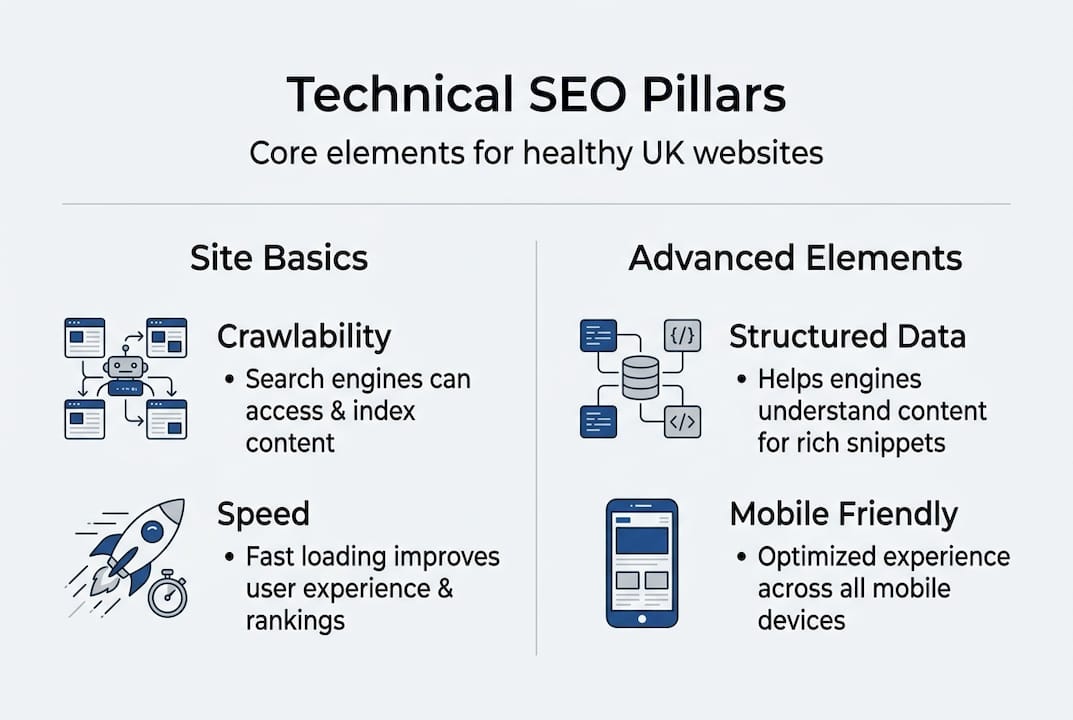
Core technical SEO elements include crawlability, rendering, indexability, site speed, Core Web Vitals, structured data, HTTPS security, mobile-first design, and logical site architecture. Each one plays a distinct role.
| Pillar | What it means | Why it matters |
|---|---|---|
| Crawlability | Bots can access all important pages | Pages that cannot be crawled will not rank |
| Rendering | Bots can see your content, including JavaScript | Hidden content cannot be indexed |
| Indexability | Correct pages are included in Google’s index | Duplicate or blocked pages waste crawl budget |
| Site speed | Pages load quickly for users and bots | Slow sites lose rankings and visitors |
| Core Web Vitals | LCP, INP, and CLS scores meet Google’s thresholds | Poor scores directly affect search performance |
| Structured data | Markup helps Google understand content | Enables rich results like star ratings |
| HTTPS | Site uses a valid security certificate | Insecure sites are flagged and penalised |
| Mobile-first design | Site performs well on smartphones | Google indexes the mobile version first |
Here is a quick breakdown of the key pillars in practice:
- Crawlability is managed through your robots.txt file, XML sitemap, and internal linking structure. If your robots.txt accidentally blocks key pages, Google simply will not see them.
- Rendering becomes critical if your site relies heavily on JavaScript. Bots do not always execute JavaScript the way browsers do, meaning content can be invisible to search engines even when it displays perfectly for users.
- Core Web Vitals are Google’s measurable experience signals. LCP (Largest Contentful Paint) measures loading speed, INP (Interaction to Next Paint) measures responsiveness, and CLS (Cumulative Layout Shift) measures visual stability. Sites that score well here gain a genuine ranking advantage.
- Structured data uses schema markup to tell Google what your content means, not just what it says. This can unlock rich results in search, such as review stars or FAQ panels, which dramatically improve click-through rates.
Good website design tips always incorporate these technical foundations from the start, rather than bolting them on afterwards. Understanding the website optimisation benefits for UK SMEs makes it clear why this investment pays off.

How to carry out a technical SEO audit
Understanding the pillars is only useful if you can actually evaluate your own site’s technical health, so here is how to carry out an audit.
- Crawl your site using a tool like Screaming Frog. It maps every URL, flags broken links, identifies redirect chains, and surfaces missing meta data in minutes.
- Open Google Search Console and check the Coverage report. This shows which pages are indexed, which are excluded, and why. It also flags crawl errors and manual penalties.
- Run a speed test using Google PageSpeed Insights or GTmetrix. Look at your Core Web Vitals scores and follow the specific recommendations provided.
- Check your sitemap is submitted to Google Search Console and that it only includes pages you actually want indexed.
- Review your HTTPS setup to confirm there are no mixed content warnings, where some page elements still load over insecure HTTP.
- Fix issues by priority. Not every error carries the same weight. Focus first on anything blocking crawling or indexing, then address speed, then structured data.
Pro Tip: When using Screaming Frog, filter results by HTTP status code. Anything returning a 4xx or 5xx error needs immediate attention. Audit tools like these also help you identify redirect chains, missing canonical tags, and pages consuming crawl budget unnecessarily.
| Issue type | Priority | Typical fix |
|---|---|---|
| Crawl errors (4xx, 5xx) | High | Redirect or restore missing pages |
| Blocked pages in robots.txt | High | Update robots.txt rules |
| Slow loading speed | Medium | Compress images, minify CSS and JS |
| Missing or duplicate meta data | Medium | Write unique titles and descriptions |
| Unsubmitted XML sitemap | Medium | Submit via Google Search Console |
| Missing structured data | Low | Add schema markup to key pages |
For a thorough walkthrough, the SEO audit steps on this site offer a practical checklist, and the detailed SEO audit guide takes you through each stage in depth.
Advanced issues and common technical SEO pitfalls
Once you have mastered the basics and can tackle an audit, it is crucial to stay alert for advanced pitfalls that can still sabotage your efforts.
These are the issues that trip up even experienced website owners:
- Pagination errors. Many sites incorrectly apply a canonical tag pointing all paginated pages back to page one. This tells Google that pages two, three, and beyond are duplicates, so products or articles on those pages may never be indexed.
- JavaScript rendering problems. If your site relies on JavaScript frameworks to display content, search engine bots may see a blank page. Server-side rendering (SSR) is often the solution, where the server delivers fully rendered HTML rather than asking the browser to build the page.
- Canonical chaos. Your site might have four versions of the same URL: with www, without www, with a trailing slash, and without one. Without proper canonical tags and redirects, Google treats these as separate pages competing against each other.
- CDN and configuration pitfalls. Services like Cloudflare can, with default settings, block certain bots or introduce caching behaviour that prevents Google from seeing your latest content. Always verify your CDN is not inadvertently blocking Googlebot.
- Mixed content on HTTPS sites. If your site has an SSL certificate but some images or scripts still load over HTTP, browsers and search engines flag the page as insecure.
Pro Tip: Always check how search engines see your pages, not just how users see them. Use Google Search Console’s URL Inspection tool to render any page exactly as Googlebot does. JavaScript-heavy sites and canonical errors are among the most common causes of pages that look fine to visitors but fail completely in search.
For businesses investing in a new site build, understanding web design for SEO from the outset prevents many of these problems before they ever appear.
Why technical SEO separates winners from invisible websites
With all the core practices covered, it is worth reflecting honestly on what separates visible, high-ranking sites from the majority stuck on page two or lower.
In our experience working with UK businesses across many sectors, the most common story goes like this: a business invests in quality content, pays for a professional-looking website, and still cannot understand why competitors with inferior writing outrank them. The answer, almost every time, is technical. A misconfigured robots.txt file, a sitemap that was never submitted, or a JavaScript framework that hides content from bots. These are not glamorous problems, but they are decisive ones.
Conventional wisdom in marketing prizes creativity and storytelling. Those things matter, but they are irrelevant if Google cannot crawl your pages in the first place. The businesses that win in organic search are not always the most creative. They are the ones who got the basics right and then built on top of a solid foundation.
Small businesses who invest in technical SEO often unlock rankings that competitors, spending far more on content and advertising, completely miss. We have seen it repeatedly, including in sectors as competitive as legal services, where SEO success for solicitors often comes down to technical precision rather than volume of content. Fix the foundation first. Everything else follows.
Expert technical SEO support for your UK business
If this guide has clarified the power of technical SEO, you might be wondering how to apply these lessons effectively in your own business.
Technical SEO delivers the strongest results when guided by someone who has seen these problems across hundreds of sites and knows exactly where to look. At Gregg King, we offer complete SEO and web design services built around your specific business goals, not generic templates. Whether you need a full technical audit, a site rebuild with SEO baked in from day one, or ongoing consultancy, we bring over 20 years of hands-on experience to every project. Discover the real SEO consultant benefits and how working with a specialist can turn your website from an invisible liability into your most powerful sales tool.
Frequently asked questions
How does technical SEO differ from on-page and off-page SEO?
Technical SEO deals with infrastructure and how search engines access your site, while on-page SEO focuses on content and keywords, and off-page SEO covers external signals like backlinks.
What are the best tools for a technical SEO audit?
Screaming Frog and Search Console are the top choices for identifying technical SEO issues, covering everything from crawl errors to indexing problems and site speed.
What is the most important part of technical SEO?
Crawlability and indexability are the absolute foundation: if Google cannot access and understand your key pages, nothing else you do for SEO will have much effect.
Can technical SEO improve my website’s speed?
Yes, optimising images and code as part of a technical SEO process can significantly reduce loading times, improving both user experience and search rankings.
Recommended
- How to write SEO content: a practical guide for UK businesses
- Advanced SEO Strategies UK Businesses Must Adopt in 2026 – Gregg King SEO
- Understanding search rankings: clear strategies for UK businesses
- Optimise your website: proven strategies for UK business
- Technical SEO for Plumbers. Boost Speed and Local SEO